
Today I decided to return to lifehacker for my coding lessons. I liked the layout of their website and the sound of the guy who teaches, Adam Dachis, doesn’t put me to sleep.
First off, it’s a good idea to read the text first that goes with the video if you’re a newbie at coding. Also, I’ve quickly discovered that being a VERY fast typer as well as typing without having to look at the keys is almost essential in these fast-paced videos.
The definitions that I am getting into today is that of an array and the logic that can be used with them.
The array command can be brought up with myArray = newArray();
Arrays are used to store data, but unlike variables, they can store more than one piece of data.
In the array I created, I stored 4 names inside of it. Using the alert command from the very first lesson in lifehacker, we can create an alert that lets us know how many pineapples each person ate in the array.
Adam teaches the commands,
(i=0; i<myArray.length; i++)
in this lesson, he’s saying that i is starting at 0 because how java works is that the first name in the array, (Randy), is set to 0. By starting at 0, we start at the name Randy in the array. We state that for the length of the array (4 names that start at 0, 0 = randy, 1 = next name, 2 = etc.) for each name, we add 1 to it with the statement i++.
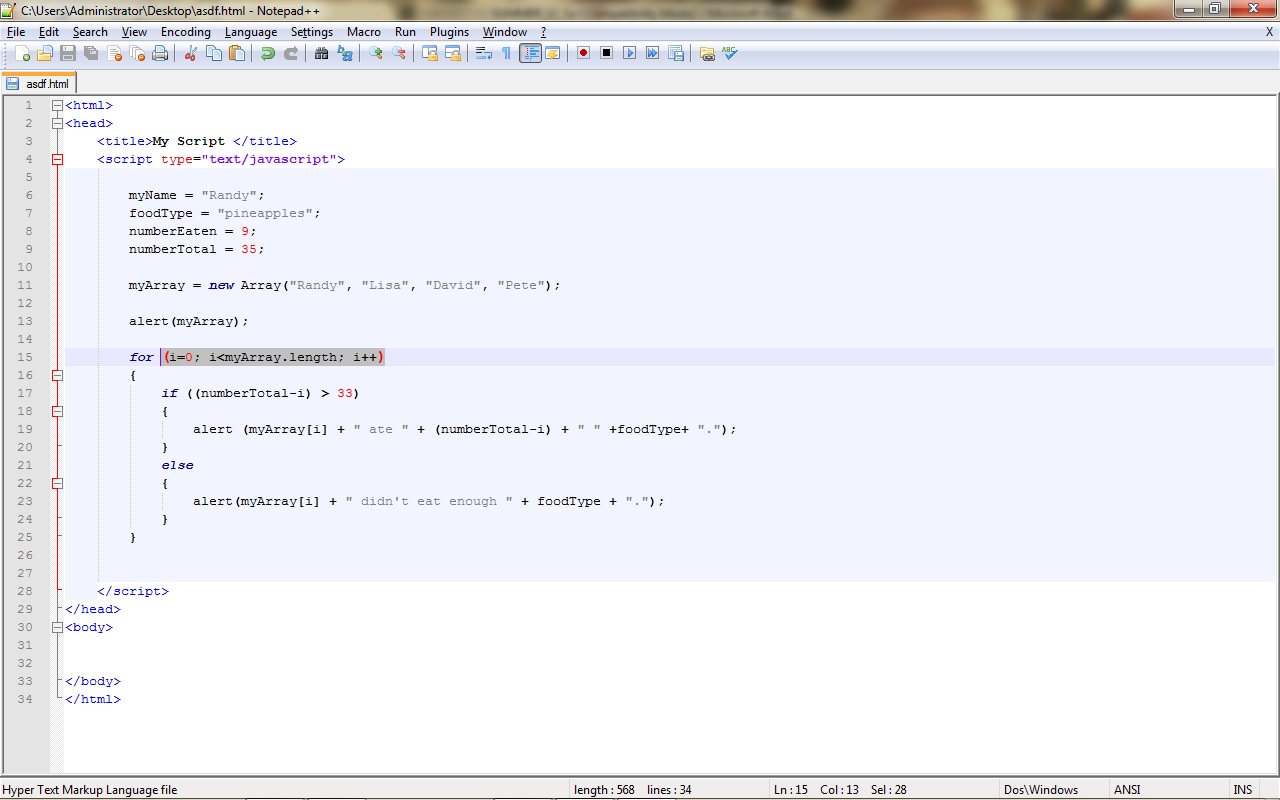
With the if/else loop, we can also add in alerts to appear ONLY when the amount of pineapples eaten is greater than 33. This is demonstrated by adding
if ((numberTotal-i) > 33)
{
alert (myArray[i] + ” ate ” + (numberTotal-i) + ” ” +foodType+ “.”);}
else
{alert(myArray[i] + ” didn’t eat enough ” + foodType + “.”);}
}
This is a great way to explore how to intertwine the use of logic and arrays. By using logic, we can greatly customize how data is re-called for the user to see.
 thinlyspreadjavascript